
Meta Business Suite
Meta Platforms, Inc.Business
4.681.44K Reviews
- Version
- 578.0.0.53.105
- Installs
- 100.00M
- Age Rating
- Everyone
Screenshots



Our Review of Meta Business Suite
 Analysis by Appyee
My first week with Meta Business Suite would be most useful if I treated it as a workbench, not as another social feed to check whenever I had a spare moment. The appeal is immediate: Facebook and Instagram activity sit together, so I can prepare content, handle incoming conversations and review results without hopping between their separate apps. The real test, though, is whether that convenience holds once posting becomes routine and the novelty wears off.
Who gets value from the setup
I’d recommend it first to a small business owner, solo creator or compact team whose day already involves both Facebook and Instagram. If you answer customer questions on those channels and publish regularly, keeping the work in one place can reduce the little interruptions that make social media feel like a second job. Meta Platforms, Inc. makes the app, and its focus is specifically business activity across its own social platforms.
It is less compelling if your audience and work are spread across several unrelated networks. The app does not replace a broad social-media management system: someone coordinating campaigns across platforms such as LinkedIn, TikTok and other services will still need separate tools or a more expansive service. I would choose it for a Meta-centered routine, not because a single dashboard sounds convenient in the abstract.
That distinction matters on day one. Instead of moving every task into the app immediately, I’d start by connecting the business presence I actually use, then test one scheduled post and one round of replies. A small trial makes it easier to spot whether the combined workflow fits the way I already work, before I rely on it for time-sensitive customer conversations.
A realistic working day
Picture a café owner who takes a quick photo before opening. They can prepare a Facebook and Instagram post in one sitting, schedule it for later, and then turn to customers rather than remembering to publish during the lunch rush. If a question arrives on either channel, the shared inbox gives them a central place to check and respond. Later, the insights view can help them see whether that post drew attention, rather than judging its success only by how busy the café felt.
The useful habit here is to separate making content from monitoring it. I’d batch a few posts when I have time, schedule them, and check messages at planned points during the day. That avoids opening the app repeatedly just to see whether anything has happened. Scheduling is not a substitute for being available to customers, but it can take the pressure off publishing at exactly the right moment.
I would also avoid treating every available metric as a verdict on the business. Reach, engagement and impressions answer different questions; none alone tells me whether a post led to a useful conversation or a sale. Comparing similar posts over time is more practical than reacting to one result. The dashboard works best as a prompt for a modest adjustment—perhaps a clearer caption or a different posting approach—not as proof that one format always wins.
Keeping the routine useful
I find this app works best when I decide in advance what I want it to take off my plate, rather than checking it simply because it is there. A small weekly plan for posts and a few purposeful inbox checks can make the routine feel manageable; from there, I can judge whether the combined workspace is earning its place or creating another habit to maintain.
First impressions
When I first opened the app, I was greeted by a clean, intuitive interface. It’s like the designers knew exactly what a busy social media manager needs. Everything is right where you expect it to be. No more jumping through hoops to find what you’re looking for. And let’s be honest, in the world of apps, that’s a big deal.
The Meta Business Suite combines Facebook and Instagram into one platform. So, if you’ve been dreaming of managing your posts, messages, and insights from a single app, your wish has been granted. It’s like having a digital assistant that doesn’t need coffee breaks.
Features that stand out
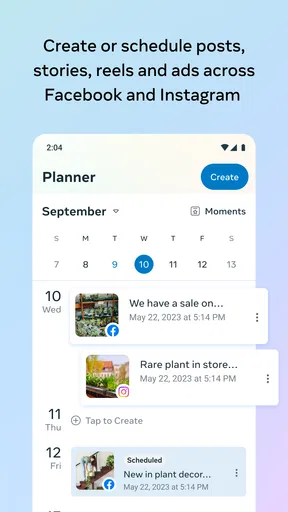
One of the standout features is the ability to schedule posts for both Facebook and Instagram simultaneously. For anyone juggling multiple campaigns, this is a game-changer. No more setting reminders to post or hopping between apps to get your content out there. Just set it and forget it.
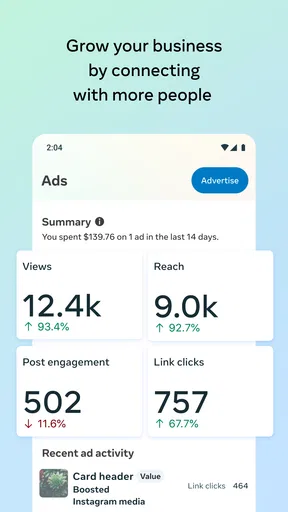
Another nifty feature is the insights dashboard. I’m a sucker for data, and the app doesn’t disappoint. It offers a comprehensive look at how your posts are performing. You can see everything from reach and engagement to impressions. It’s like having a crystal ball that tells you exactly what’s working and what’s not.
Streamlining communication
Let’s talk messages. If you’re anything like me, keeping up with messages across platforms can feel like herding cats. Thankfully, the app consolidates all your messages into one inbox. Whether it’s a DM on Instagram or a message on Facebook, you can respond seamlessly without switching apps. It’s a small detail, but it can save you a ton of time.
For that inbox to remain helpful, I’d treat it as a place to process conversations rather than as a guarantee that nothing will ever be missed. Build a simple routine: scan new messages, answer what can be resolved quickly, and make a note of anything that needs a more considered response. That is especially useful when a customer question needs checking with a colleague or when a conversation should move to a more suitable channel.
Where the convenience has limits
No app is perfect, and the Meta Business Suite is no exception. While it does a great job at combining Facebook and Instagram, it would be amazing to see support for other platforms in the future. Imagine a world where you could manage Twitter, LinkedIn, and TikTok all in the same place. A dream, right?
Occasionally, there are slight lags when loading analytics, but nothing that’s a deal-breaker. It’s like waiting for your coffee to brew—it’s worth the wait.
There is also a practical trade-off in putting several tasks together: a central workspace can save context-switching, but it can become another place to check too often. I’d turn the app into a deliberate part of the workday rather than leave it open as a constant distraction. If messages are quiet, a scheduled check is enough; if the business depends on quick replies, the owner should set a realistic response routine and make sure someone is responsible for it.
What earns its place month to month
The recurring value is not a clever first impression; it is the time saved by repeating a dependable workflow. Drafting and scheduling ahead can help during busy weeks, while one inbox reduces the mental load of remembering which platform holds a customer’s question. The insights become more useful when reviewed periodically and compared with the goals of the business, rather than opened after every post in search of instant reassurance.
For a small team, I’d agree on a basic division of work before relying on the app: who prepares posts, who approves them, and who handles replies. Even when one person does all three, keeping those steps distinct can prevent a rushed message or an unfinished draft from being mistaken for completed work. A short weekly review can then identify what needs attention without turning every quiet moment into a dashboard check.
Compared with managing Facebook and Instagram directly in their individual apps, the main advantage is having publishing, conversations and performance checks gathered in a business-oriented workspace. The individual apps may still feel more natural when I am browsing or creating something that needs a platform-specific touch. Compared with a wider third-party management tool, this app is the more focused choice: it is convenient when Meta channels are the center of the job, but less suitable when consistent reporting and publishing across many networks are essential.
Maintenance, fatigue and fit
The maintenance burden is modest only if the account’s working habits are clear. Scheduled posts still need sensible captions and timing; an inbox still needs a person to answer; and insights still need interpretation. The app can organize those jobs, but it cannot decide what the business should say or make neglected conversations feel personal. I would keep a small content plan and a regular message-checking habit outside the app’s interface, so the workflow does not depend on remembering everything while tapping through screens.
Fatigue is most likely when every metric becomes a reason to refresh, or when the owner tries to turn each channel into a constant stream of content. I find it healthier to decide what a useful result looks like before publishing: a conversation, awareness of a service, or steady interaction with existing customers. That keeps analytics in proportion and makes it easier to pause or change direction when the numbers do not support the effort.
The app is free, is rated for Everyone, and has been available since January 28, 2014. Its current version is 555.0.0.50.109. Its 4.6 average from around 5.1 million ratings and more than 100 million installs suggest that it has broad reach, though popularity alone cannot tell me whether it suits a particular business. For me, fit comes down to whether Facebook and Instagram are central enough to justify making this the regular place for publishing and replies.
The verdict
All in all, the Meta Business Suite is a solid tool for anyone serious about their social media game. It’s user-friendly, packed with features, and does a fantastic job of simplifying the chaos of managing multiple accounts. Whether you’re a small business owner or a seasoned social media manager, this app is worth checking out.
So, if you’re ready to take your social media management to the next level, give it a whirl. It might just become your new best friend in the digital world.
My longer-term recommendation is more specific: give it a regular place in your week if it genuinely replaces scattered posting and message checks, and keep using it as long as that routine stays lighter than the alternatives. If your work requires several social networks, detailed cross-platform coordination, or a different style of reporting, choose a broader tool instead and use Meta’s own apps where they serve you better. For a business built around Facebook and Instagram, though, the combination of scheduled publishing, a shared inbox and performance insights gives the app a practical reason to stay installed after the first-week curiosity fades.
Privacy and Permissions
See what permissions an app requests and how it handles your data.
- Identity
- find accounts on the device
- Contacts
- find accounts on the device, read your contacts
- Location
- approximate location (network-based), precise location (GPS and network-based)
- Phone
- directly call phone numbers, read phone status and identity
- Photos/Media/Files
- read the contents of your USB storage, modify or delete the contents of your USB storage
- Storage
- read the contents of your USB storage, modify or delete the contents of your USB storage
- Camera
- take pictures and videos
- Microphone
- record audio
- Wi-Fi connection information
- view Wi-Fi connections
- Device ID & call information
- read phone status and identity
- Other
- view network connections, create accounts and set passwords, pair with Bluetooth devices, change network connectivity, connect and disconnect from Wi-Fi, full network access, change your audio settings, run at startup, control vibration, prevent device from sleeping, install shortcuts
Verdict
Strengths of Meta Business Suite
- Intuitive interface for easy navigation.
- Seamless integration with Facebook and Instagram.
- Comprehensive analytics and insights.
- Efficient scheduling for posts and stories.
- Free to use with extensive features.
Limitations of Meta Business Suite
- Can be slow with extensive data.
- Limited customization options.
- Occasional sync issues with accounts.
- Mobile app lacks some desktop features.
- Notifications can be overwhelming.
Other Releases by Meta Platforms, Inc.
View All


Similar Picks in This Category
View All
LinkedIn: Community & Network
LinkedIn3.8

Zoom Workplace
zoom.com4.1

Microsoft Teams
Microsoft Corporation4.6

Webex Meetings
Cisco Systems, Inc.4.5

TeamViewer Remote Control
TeamViewer4.4

File Commander Manager & Vault
MobiSystems4.2
Frequently Asked Questions
What is Meta Business Suite, and how does it benefit my business?
Meta Business Suite is a comprehensive app designed to streamline business management across Facebook and Instagram. It allows you to manage posts, messages, and insights all in one place. Businesses benefit from increased efficiency, as it simplifies scheduling, monitoring engagement, and analyzing performance metrics, making it easier to grow your online presence.
Is Meta Business Suite free to use, or are there any costs involved?
Meta Business Suite is free to use for businesses of all sizes. It provides essential tools for managing your social media presence without any cost. However, if you choose to run ads through the platform, you'll incur charges based on your advertising budget and campaign settings.
Can I manage multiple business accounts with Meta Business Suite?
Yes, Meta Business Suite supports managing multiple business accounts. You can easily switch between different Facebook and Instagram accounts within the app, making it convenient for agencies or individuals handling multiple brands. This feature helps in maintaining consistent branding and engagement across various profiles.
What types of insights and analytics does Meta Business Suite offer?
Meta Business Suite provides detailed insights and analytics to help you understand your audience better. You can track metrics such as reach, engagement, and follower growth. It also offers data on post-performance and audience demographics, empowering you to make informed decisions to optimize your social media strategy.
How do I schedule posts using Meta Business Suite?
Scheduling posts with Meta Business Suite is straightforward. Simply navigate to the 'Posts & Stories' section, create your content, and select the 'Schedule' option. You can set the date and time for your posts to go live, ensuring consistent engagement with your audience without manual posting.
